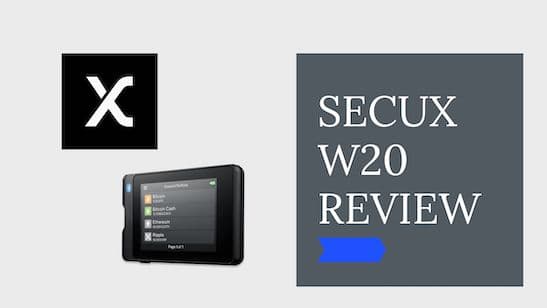
SecuX W20 Review
Pros
- Large touchscreen
- Military-grade Infineon Secure Element chip
- Supported on Windows, Mac OS, Chrome OS, Linux, iOS, Android
- Compatible recoverability with BIP32, 39, and 44 standards
Cons
- Relatively new on the market
Disclosure: We earn affiliate commissions on some products linked here. This never affects our rankings.
Affiliate link — we may earn a commission at no extra cost to you.
In this article, you will get insight into our SecuX W20 review.
My name is Leo, I have an MSC in Computer Science, and I am an entrepreneur for 20 years. I had my first contact with Cryptocurrencies in 2013. Now I am working full-time in the Web3 Space. I was using all kinds of hardware wallets myself, and in this review, I will do an in-depth check of the SecuX W20.
Leo with SecuX W20 Hardware Wallet
We will have a look at:
- the companies background
- the best features
- the hardware
- security
- how to set it up and make the first steps
- supported cryptocurrencies
- the price
- and other SecuX products
Let's get started with the review!
At a Glance
At a Glance: SecuX W20
| Type of Wallet | Cold Storage Hardware Wallet |
| # Coins and Tokens | 1000 + |
| Purchase Cost | $119 |
| Incorporated Exchange | no |
| App | Multiple OS on computer and mobile |
| Device Size | 1.3 x 8.9 x 5.9 cm and 62g |
| Touchscreen | 2.8 inches color LCD touch display |
| Special Features | Cross platform support, Hidden Wallet, Up to 500 Accounts |
SecuX W20: Background
SecuX Technology Inc is a Taiwanese company that was founded in 2018. The company is dedicated to solving problems in the blockchain space to apply blockchain technology in daily life. They are an experienced team from fields such as information security, electrical engineering, blockchain technology, international business management, and fintech.
2019 the first cross-platform crypto hardware wallet was launched during CES 2019, and later down the year, the IOS App launched, and the SecuX V20, W20, and W10 were shipped globally. One of their newer products is the SecuX Nifty, an NFT Hardware Wallet.
SecuX W20: Hardware
The chassis, with a dimension of 1.3 x 8.9 x 5.9 cm, feels solid and robust and weighs only 62g. The power button is easy to access and ergonomic.
You can manage your digital assets and browse through a 2.8-inch hardware wallet LCD touch screen.
The crypto hardware wallet comes with an Infineon SLE Solid Flash CC EAL5+ Secure Element Chip, a military and banking level security chip.
You can charge the device's 600mAh Rechargeable Lithium Polymer Battery within 30 minutes through the Micro-B USB connection. You can use the portable wallet for up to seven hours when fully loaded.
Through the onboard Bluetooth 5 connection, you can conveniently connect to your mobile app.
SecuX W20 Review - Weirdo.Rocks
SecuX W20: Security
SecuX Wallets offer state-of-the-art security features to keep your digital assets safe.
The Bluetooth 5 chip also has AES encryption enabled to further encrypt sensitive data while transmitting. To connect via Bluetooth, you also require an OTP (One-Time-Password). The private key used for signatures of transactions remains securely stored inside the security chip.
The Infineon secure chip offers EAL5+ security (of 7 EAL levels). EAL5+ provides the highest level of protection against attack vectors like penetration attacks. Mastercard and Visa are using the same chips in their cards.
💡 EAL means Evaluation Assurance Level
The SecuX W20 additionally has a hidden wallet feature that allows you to set up an extra, not visible wallet parallel to the one you already have set up. The hidden wallet required an additional passphrase to access your accounts and the addresses of the second account. You can set up as many hidden wallets as you like. Each wallet needs to have a different passphrase.
If somebody forces you to hand over the hardware wallet, you still have access to the hidden funds with your recovery words, the passphrases, and the personal PIN Code.
The device will be wiped after five failed attempts to enter your personal PIN for security reasons.
For additional safety, SecuX has different products like the SecuX XSEED Pro, SecuX XSEED Plus, and SecuX XSEED as a storage solution for your 24-word seed code.
SecuX W20: Key Features & Functionality
The SecuX W20 appeared to be very easy to use, and you can manage, send and receive your Bitcoin, Ethereum, etc. Due to the cross-platform support, you can access your digital assets almost anytime and anywhere.
Their hardware wallets support over 1000 coins and tokens and can manage up to 500 separate accounts. You can access the different accounts by the personal PIN you can choose during account creation.
Your private key and PIN are stored in the military-grade Infineon SLE Solid Flash CC EAL 5+ Secure Element.
Their hardware wallets support over 1000 coins and tokens and can manage up to 500 accounts.
The useability of the device is smooth, which makes the use of the device a good user experience. The secured Bluetooth connection makes connecting to the application on different platforms very convenient.
SecuX partnered up with the DAPS privacy coin. DAPS focuses on security and privacy and offers a decentralized anonymous payment system.
SecuX W20: Supported Cryptocurrencies
SecuX wallets support 1000+ tokens and coins. Most crypto assets are available on the Web, IOS, Android, and SecuX Wallets.
Besides the major cryptocurrencies Bitcoin (BTC), Ethereum (ETH), Tether (USDT), Binance Coin (BNB), Cardano (ADA), Polkadot (DOT), Fantom (FTM) Two of my favorite projects Avalanche (AVAX) and Helium(HNT) are not supported at the moment.
From different blockchains, Ethereum's ERC-20, Tron's TRC-10, and TRC-20 and BSC's BEP-20 Tokens are supported.
Here you will find the complete list of all the coins. (Get 15 % off with our Code "WeirdoRocks")
SecuX W20: The First Steps
SecuX W20 - What is in the Box
After Unboxing, you should find the following items in your box.
- SecuX W20 Crypto Hardware Wallet
- USB Micro-B Cable
- Wallet Pouch
- Quick Start Guide
- Two pieces Recovery Sheets
That's how to set your device up.
SecuX W20 Welcome Screen
Step 1: Charge your SecuX W20
Charge your device by connecting the device with the provided USB cable. It is recommended to charge for at least two hours for the first charge.
Step 2: Set your personal device PIN
Keep the button pressed for two seconds and turn on the device. Define your PIN code. The code can be four to eight digits long. You will need this PIN to access your device.
💡 After five failed attempts to enter your personal PIN, the device will be wiped for security reasons. You can always restore it with your recovery phrase.
Step 3: Define a Device Name
You can give your device a name of up to 13 letters.
Step 4: Create a new wallet (or restore one)
The SecuX wallet allows 12, 18, or 24 words seed phrases to protect your valuable assets. Generate your private key based on your recovery words. Please note that you need to store your seed phrase in a safe place. Do not make digital copies of it. If your SecuX device gets stolen or destroyed, you can use your 12-24-Word Recovery Phrase to restore your cold storage wallet.
⚠️ If you lose your recovery words or somebody steals them, your assets might be lost. Keep them safe.
Congrats, you can start using your device.
SecuX Products and Prices
Here is an overview of how the different products are priced. To check the current prices check the website here.
| Product | Description | Price in USD | |
|---|---|---|---|
| SecuX W20 Hardware Wallet | Hardware Wallet for Urban Nomads | $119 | Buy now |
| SecuX V20 Hardware Wallet | Vault Grade Security Hardware Wallet | $139 | Buy now |
| SecuX W10 Hardware Wallet | SecuX Hardware Wallet - Best Value (no Bluetooth) | $69 | Buy now |
| SecuX Nifty Hardware Wallet | NFT Hardware Wallet | $199 | Buy now |
| SecuX XSEED | Seed Backup Kit | $39 | Buy now |
| SecuX XSEED PLUS | Seed Backup Kit - Protect against water and fire | $59 | Buy now |
| SecuX XSEED PRO | Indestructible backup System for your seed phrase | $89 | Buy now |
| SecuX Bundles | Different bundles with additional discounts | Buy now |
Our Verdict
The cross-platform cold storage device SecuX W20 is slick and easy to use. The integrated security element chip of the hardware device adds an additional layer of protection for the private keys.
The SecuX W20 might be suitable for you if you want
- a device with Bluetooth for convenience reasons
- good security
- a great usability
See how the SecuX W20 compares against the field in our best crypto hardware wallets ranking.
Maja & Leo
Reviewed by practitioners who actually use these products.
Related
SecuX W20 Review
Trezor One vs Model T — Detailed Comparison
The Trezor Model T is the better choice for frequent users thanks to its color touchscreen and advanced security features, while the Trezor One is a solid, budget-friendly cold storage option.
Best for: Best for everyday crypto users and traders who want a premium experience; Trezor One suits budget-conscious HODLers or those wanting a backup device.
Trezor vs Ledger — Detailed Comparison
Both Trezor and Ledger offer excellent hardware wallets with strong security, but Trezor Model T wins for frequent traders thanks to its color touchscreen and additional security features.
Best for: Best for frequent crypto traders and users who value open-source software; Ledger suits cold-storage holders on a tighter budget.
Related Posts
Best Crypto Airdrops 2023
This article is about rumors and speculations about some of the most profitable Crypto Airdrops 2022. Airdrops are a great way to get started to build an initial capital in Cryptos or also to get some free money.
Cold Staking - How to stake with Ledger Hardware Wallet
Step-by-step guide to staking crypto in Ledger Live. Earn passive rewards on proof-of-stake coins while keeping your assets in cold storage.
Cold Staking - How to stake your crypto coins with BitBox02 Hardware Wallet
Learn how to stake your crypto coins with the BitBox02 Hardware Wallet. Staking is a process which rewards holders of Proof-of-Stake (PoS) coins for keeping their wallets open and connected to the network. Find out more in this article.
Get notified when we update this review
No spam. Just a heads-up when something changes.
No spam. Unsubscribe anytime.