Cold Staking - How to stake with Ledger Hardware Wallet
Step-by-step guide to staking crypto in Ledger Live. Earn passive rewards on proof-of-stake coins while keeping your assets in cold storage.
Enjoying this article?
Get more like it every week — methods, tools, and lessons from building in Cambodia.
No spam. Unsubscribe anytime.
In this quick guide, I'll introduce everything you need to know about Ledger staking.
Staking, validating transactions on the blockchain, allows you to further participate in blockchain ecosystems and earn staking rewards and yield.
Staking is not risk-free, as usually, you have a lockup period during which you can't sell your investment if markets are crashing, exchanges can get hacked, etc.
There are some ways and steps you can take to lower the risk. You can move away from staking your digital assets on crypto exchanges, like Binance, Nexo, or Kraken, and use a hardware crypto wallet instead, known as cold staking. There are more and more (cold) hardware wallets on the market, so you have plenty of different options.
Today we will look at how staking is done with Ledger Wallet.
Why staking with Ledger?
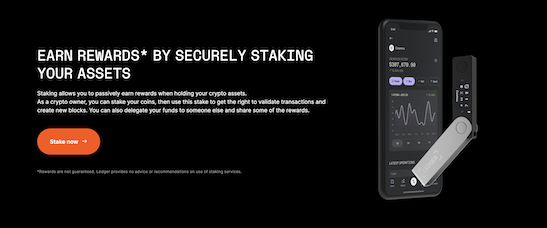
The Ledger Hardware wallet is, besides Trezor, one of the most known players in the hardware wallet industry.
You can read our detailed comparison between these two hardware wallets here: Trezor vs Ledger.
Their current lineup includes the Nano S Plus and Nano X (the original Nano S has been discontinued), plus the touchscreen Stax and Flex models — and you can stake using any of them. You can also stake multiple currencies in the same wallet, earning rewards across several coins at once.
Ledger is a highly secured and trusted hardware wallet, and you can buy, swap and stake your assets in one place as they support third-party apps, which makes staking very convenient and easy.
How to stake with Ledger Hardware wallet?
You can stake your cryptocurrencies in two ways - with their Ledger Live app for managing your assets or a third-party wallet that offers support for Ledger's hardware devices.
Hundreds of currencies currently operate on Proof of Stake (PoS). And while you can stake a limited number of them with Ledger live app, you can conveniently connect to a third-party app to expand your crypto staking possibilities.
Let's check step-by-step how the staking process goes using both ways:
Staking with the Ledger app (formerly Ledger Live):
Note: Ledger renamed its companion app from Ledger Live to Ledger Wallet in 2025 — the staking flow is the same, just a new name. Newer versions add a dedicated Staking tab that lists every asset you can stake in one place.
- Install the Ledger app on your computer or phone and set up your account.
- Install the relevant network app on your device (e.g. Ethereum, Solana, or Cosmos — each blockchain needs its own app).
- Transfer the coins you want to stake to your Ledger account.
- Open the Staking tab (or press Earn rewards on the coin), choose a provider if prompted, and enter the amount.
- Approve the transaction on your Ledger device — your staking position goes live once confirmed.
Stake with a third-party wallet:
Here are some of the supported wallets: Electrum, MyCrypto, MyEtherWallet, XRP Toolkit, Electron Cash, Polkadot-JS, Binance, Fairy-wallet Galleon, Stellar Account Viewer, Stellarterm, Yoroi wallet, AdaLite, Tronscan, GUI Wallet, Neo Wallet, Crypto.org chain desktop wallet, Nem Wallet, Firefly, Lunie, Cosmostation, NNS dapp, Glif wallet, OWallet, Elrond Wallet, MyAlgoWallet, VeChain Sync, MyHbarWallet, etc.
- Choose the third-party wallet you wish to stake
- Connect it with your Ledger device
- Add funds to your device and start staking
That's it; you are ready to start earning by receiving staking rewards.
Which cryptocurrencies can be staked with Ledger?
Ledger now supports staking for over a dozen assets directly in the app, including ETH, SOL, ATOM, DOT, ADA, XTZ, ALGO, TRX, POL (the token formerly known as MATIC), and more. For Ethereum specifically, staking is offered through providers such as Lido and Stader (liquid staking, no minimum) or Kiln and Figment (dedicated staking) — you pick the provider inside the app.
Reward rates vary a lot by asset and change over time — for example, ETH has recently been around 3–3.5% APY while Cosmos (ATOM) can reach the high teens. Always check the current rate in the app before staking, and treat any quoted APY as an estimate, not a guarantee.
Because the supported list keeps growing, check Ledger's official, always-current list rather than relying on this page.
Besides the assets above, you can stake many more using third-party wallets that you can connect to your Ledger device. If you are interested in any of the coins not listed above, you can review the available staking options and wallet compatibility here.
By connecting your Ledger with the supported third-party wallet, you can also get extra features not yet supported with Ledger Live. E.g., Komodo currency can be managed in Ledger Live, but for claiming rewards, you'd need to use a third-party wallet. You can also backup in case of an unexpected temporary outage of Ledger Live.
Alternative hardware wallets for staking
If you are looking for alternative wallets, we recommend looking at Trezor, another big player on the market. You can read all the details in our Trezor Staking article.
Is it worth Staking with Ledger?
If you are staking a considerate amount of crypto assets, you should look into more secure ways to move from staking on exchanges to more offline possibilities using hardware wallets.
Ledger is a trusted hardware wallet that gives you many staking options using their native Ledger Live app or any supported third-party wallets.
Ledger's devices are competitively priced compared with other wallets on the market — the Nano S Plus sits at the budget end and the Nano X (with Bluetooth) and touchscreen Stax/Flex models cost more. Check the current prices on Ledger's site, as they change with promotions and new models. All of them support staking.
Frequently Asked Questions
Can you stake crypto on a Ledger?
Yes. You can stake directly through the Ledger app (formerly Ledger Live, now Ledger Wallet) for a dozen-plus proof-of-stake assets, or connect your Ledger to a supported third-party wallet for even more. Your keys stay on the hardware device the whole time.
What coins can you stake on Ledger?
Directly in the app you can stake ETH, SOL, ATOM, DOT, ADA, XTZ, ALGO, TRX, POL and others; the list keeps growing. Ethereum staking is offered via providers like Lido, Stader, Kiln and Figment. Check Ledger's official supported-assets page for the live list.
Is staking on Ledger safe?
Cold staking with a hardware wallet is one of the safer ways to stake because your private keys never leave the device. The main risks are market volatility and any lock-up/unbonding period during which you can't sell — not custody of your keys. It's still not risk-free, so only stake what you can afford to lock up.
Disclaimer
This website includes information about cryptocurrencies and other financial instruments. All these areas are complex instruments and have a high risk of losing money. We are NOT giving financial or investment advice; this page is for educational and informational purposes only. Please be careful and make sure that you understand how these instruments work. Also, think about whether you can afford to take the risk of losing your money.
Weirdo.Rocks encourage you to do your own research before you make any investment decision.
Related Course
Cryptocurrency for Beginners
Go from zero to crypto-confident in one weekend
Take the course →More Web3 & Crypto

Best Crypto Airdrops 2023
This article is about rumors and speculations about some of the most profitable Crypto Airdrops 2022. Airdrops are a great way to get started to build an initial capital in Cryptos or also to get some free money.
Cold Staking - How to stake your crypto coins with BitBox02 Hardware Wallet
Learn how to stake your crypto coins with the BitBox02 Hardware Wallet. Staking is a process which rewards holders of Proof-of-Stake (PoS) coins for keeping their wallets open and connected to the network. Find out more in this article.
Stake Crypto with Ellipal Titan: ADA, Tezos & More
Learn how to stake crypto coins securely with the Ellipal Titan Cold Wallet. Our expert guide covers Tezos staking pools, ADA staking, and more. Get actionable insights and tips for risk management in crypto staking.