Tutorial: How to setup Fantom ($FTM) on Metamask & buy $BOO
Add the Fantom network to MetaMask and send FTM from Binance in minutes. Simple step-by-step setup to join the Fantom ecosystem safely.
Enjoying this article?
Get more like it every week — methods, tools, and lessons from building in Cambodia.
No spam. Unsubscribe anytime.
⚠️ Important update (2025–2026): Fantom is now Sonic. In January 2025 the Fantom Foundation rebranded to Sonic Labs, and the FTM token is being migrated 1:1 to the new Sonic (S) token. The old "Fantom Opera" network and the FTM ticker are being phased out, and exchanges are delisting FTM. If you still hold FTM, use the official migration portal (linked from soniclabs.com) to swap FTM → S — note the swap is one-way. The walkthrough below describes the legacy Fantom Opera / FTM setup and is kept for reference; for the current network, add Sonic instead (easiest via chainlist.org).
In this tutorial, I will give you some information about the Fantom Network, and show you how to add Fantom (FTM) to Metamask, and how to buy your first token in the Fantom Ecosystem.
Do you ask yourself, how can I join the Fantom Ecosystem and start profiting from it besides just buying the $FTM Token? We have you covered. If you want to dive deeper into Fantom, find my Fantom Project Review here.
There are many reasons, like low gas prices, network speed, and upcoming opportunities in the network, to mention a few, for getting started with the digital asset Fantom.
We need to set up a compatible wallet with the Fantom Network. Many compatible crypto wallets are available, but we will use Metamask. We compared the most popular Crypto Hardware Wallets here if you look for one.
The FTM Token is the Gas on the Fantom network, so we need to get some $FTM Tokens into our newly configured Wallet. We also will cover how to bridge Coins (be aware that there will be Gas Fees) over from the Ethereum or Binance Chain Networks to the Fantom Network. If you already have a Fantom wallet and Metamask setup, no worries - we can always do the next step so we can buy BOO or any other coin available on the Fantom Network.
Before starting, you need to have a Metamask Wallet up and running; if you did not, here is a video where I explain how to do that.
Introduction to the Fantom Ecosystem
If you want to see if the Fantom Ecosystem is worth your time, money, and energy, check out my recent Fantom ($FTM) project review. But now, let's get started.
Fantom (FTM) is the Gas on the Fantom Ecosystem, like Ether (ETH) on the Ethereum Blockchain and the Binance Coin (BNB) on the Binance Smart Chain
Fantom has a native custom token implementation but also an implementation as an ERC-20 token (Ethereum) and BEP-2 token. The Fantom Ecosystem is fully compatible with the Ethereum Virtual Machine (EVM), which means popular Ethereum applications can run on the Fantom (now Sonic) smart-contract platform — early examples were SushiSwap and Curve. (For live price and market-cap data, check a source like CoinGecko rather than relying on this page.)
](/images/posts/tutorial-how-to-setup-fantom-ftm-on-metamask-and-get-started/sushiswap-fantom-weirdo-rocks-dex.jpg)
There are not so many native projects yet on the Fantom Chain. The recently 370 Mill USD Decentralized Finance (DeFi) Incentive Program) should change that in the next month. This program is a great opportunity for new projects to raise and make huge gains with native Fantom projects.
But let's get started with getting you ready for the show.
Setup Metamask
It would be best if you had Metamask installed for this step. If you do not know how to do that, I prepared a little video for you. After setting up your MetaMask correctly, you can continue from here.
Add the Fantom Opera Network to your Metamask
Requirements:
- You have your Metamask Wallet up and running if you return to Setup Metamask.
Before using your Fantom Opera address, we need to configure the Fantom Opera Network in your Metamask.
Step 1: Log in to your Metamask
Login as usual.
Step 2: Open the "Add network" screen
Easiest method today: go to chainlist.org, connect MetaMask, search for Sonic (or Fantom for the legacy network), and click Add to MetaMask — it fills every field for you. The manual steps below still work if you prefer to enter the details yourself.
Click the network dropdown at the top of MetaMask, then Add network → Add a network manually.
Step 3: Fill the fields and Save
The legacy Fantom Opera parameters are below for reference. For the current network, add Sonic instead (Chain ID 146) — grab the up-to-date RPC and explorer from chainlist.org so you're never copying a stale endpoint.
- Network Name: Fantom Opera
- New RPC Url: https://rpc.ankr.com/fantom/****
- ChainID: 250****
- Symbol: FTM****
- Block Explorer URL: https://ftmscan.com/
Now you can switch between your Networks FTM and ETH and use the same address for your Ethereum and Fantom Digital Wallet.
How to send FTM to your Metamask
As mentioned before, the FTM Token is the Gas for the Fantom Network, so the next step is to add some Fantom Tokens to be able to make transactions. Here we have multiple options.
Option 1: Claim Free FTM from Spookyswap
Join Spookyswap's Discord Channel. Go to the #faucet channel and type
!faucet.
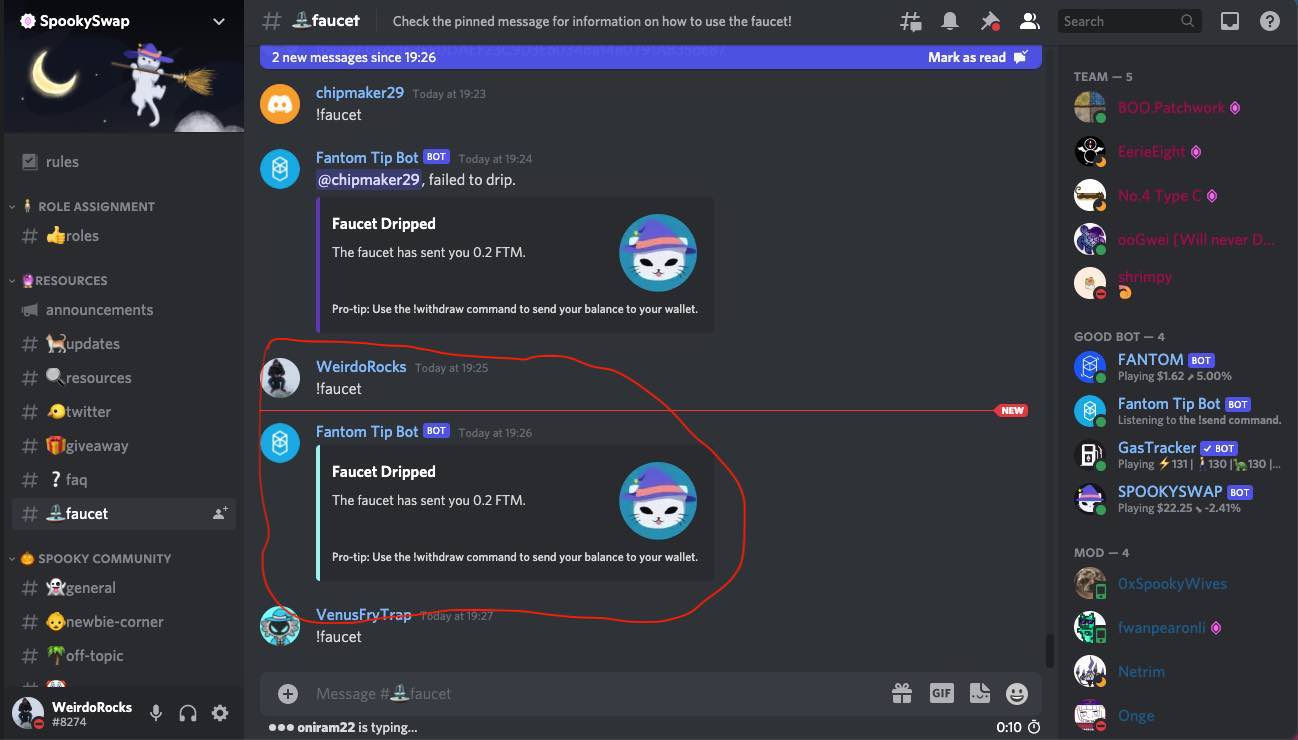
Now it's time to transfer the 0.2 FTM to your Metamask Wallet
You can do that with the command.
!withdraw XaddyourMetamaskaddresshere
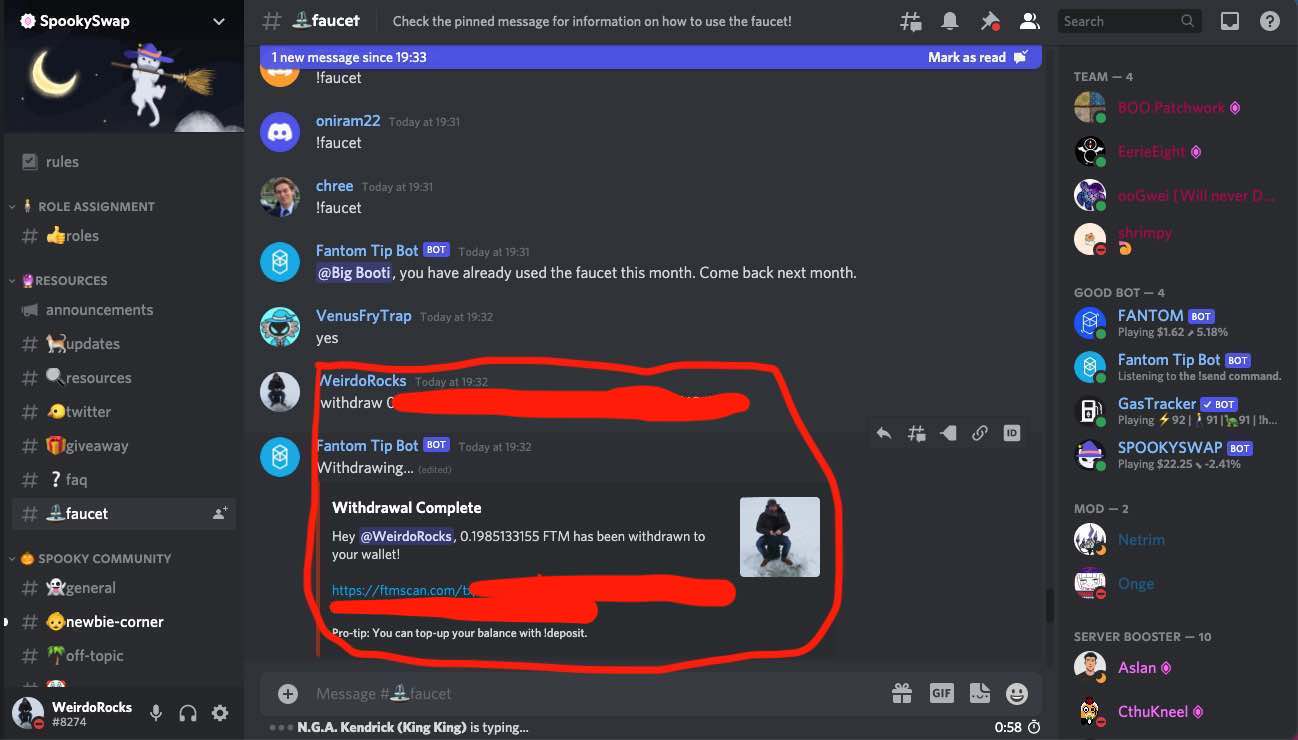
A couple of seconds later, you should get a success message and see the funds in your Metamask Wallet. Here we go.
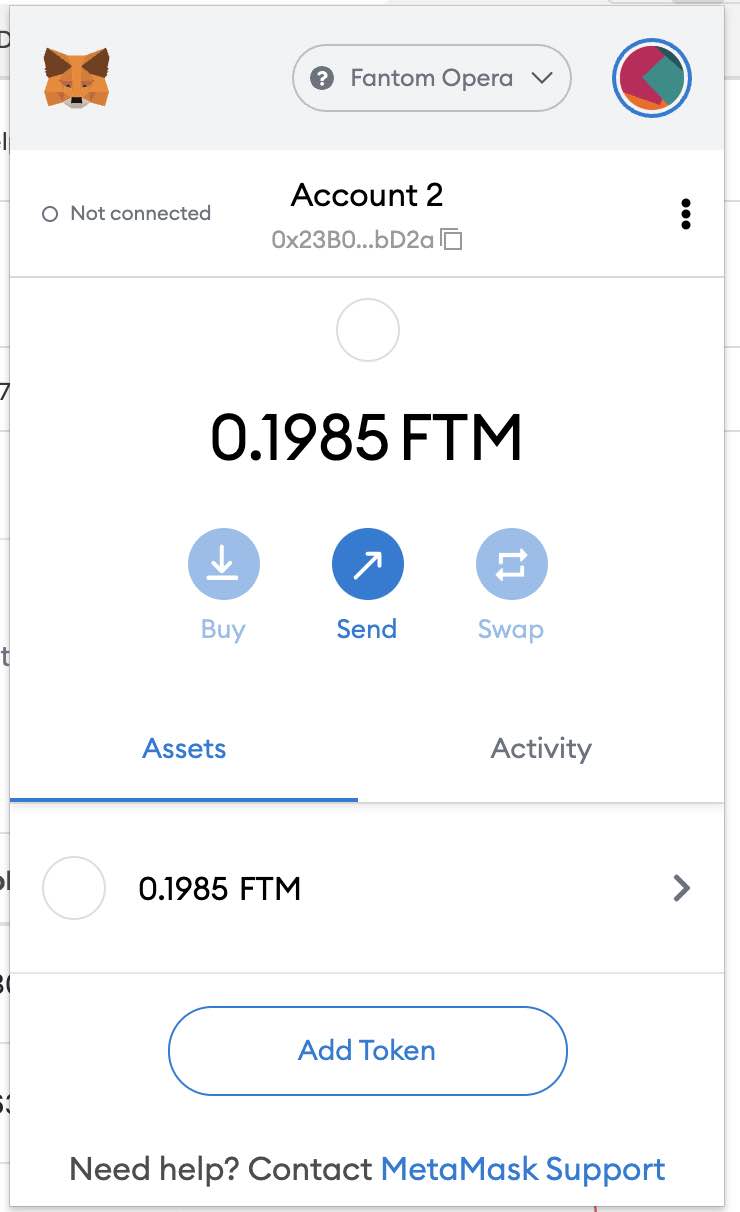
With these 0.2 FTM Tokens, you can make a bunch of transactions and use some decentralized applications due to the very low network fees in the Fantom Network. Another option is to transfer FTM Tokens to your Metamask Ethereum Wallet and then bridge them to your Fantom Network. Let's see how this works.
Option 2: Transfer Funds from Binance (or other Exchanges) to Metamask
Fantom can be bought at almost any exchange. Here you find a comparison of our favorite crypto exchanges.
Step 1: Log in to your Binance Account
Buy FTM Tokens if you did not do that yet. You can also transfer.
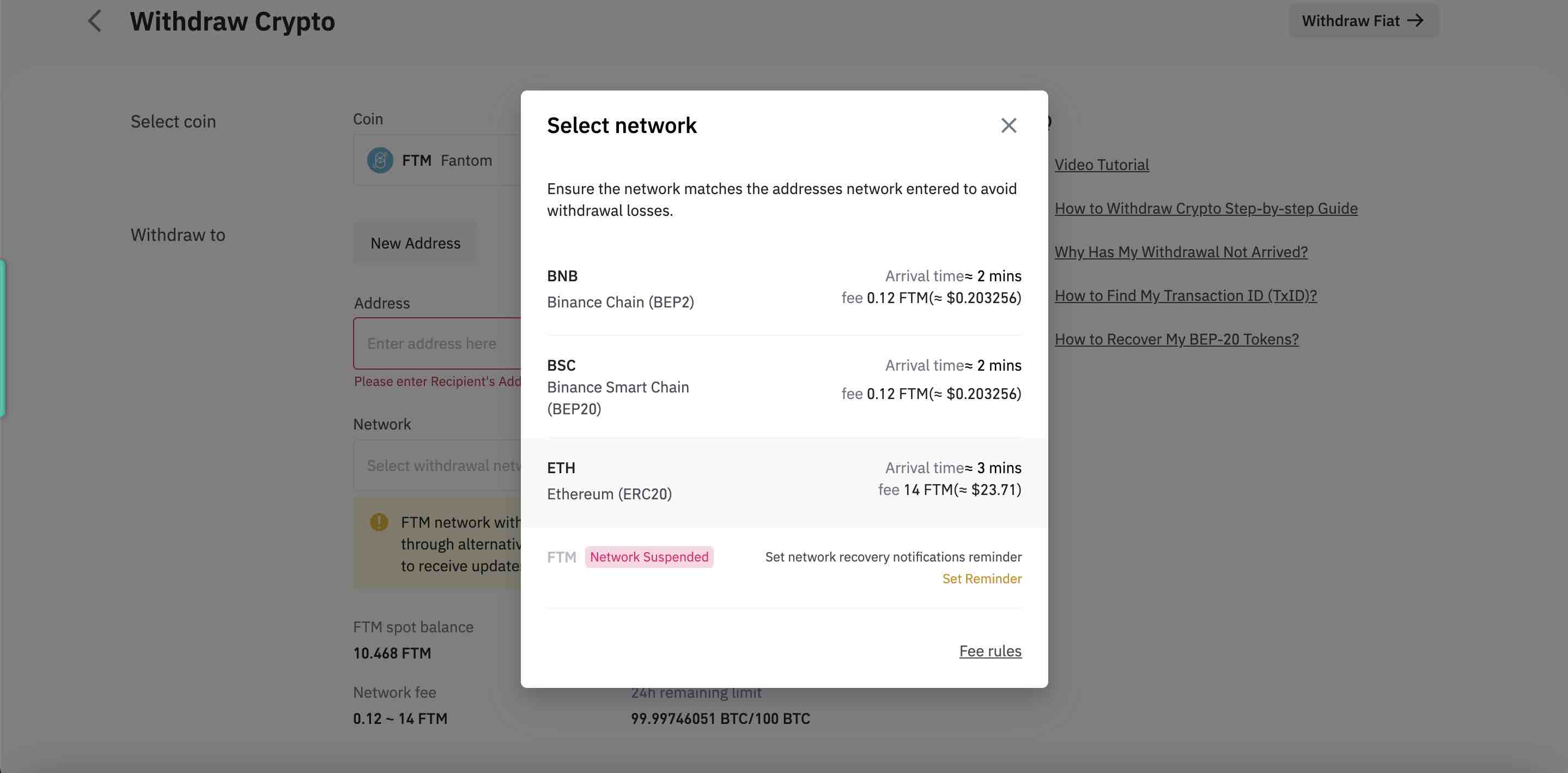
Step 2: Transfer $FTM to your Metamask Ethereum Wallet
Choose the FTM Token, withdraw function choose Ethereum Network. There will be a network fee of around 20 USD.
🚫 Do not use Multichain. This tutorial originally recommended the Multichain bridge — Multichain collapsed in July 2023 after a ~$130M+ exploit and the arrest of its CEO, and it no longer operates. Never send funds through it. The original bridging steps have been removed for your safety.
The simplest and safest way now: skip bridging entirely. Most major exchanges (Binance, Kraken, and others) let you withdraw directly onto the native network — choose the Sonic (or Fantom) network in the withdrawal screen and send straight to your MetaMask address. That avoids third-party bridge risk altogether.
If you genuinely need to bridge between chains, only use a reputable, audited bridge that is currently operational (for example, the official Sonic gateway linked from soniclabs.com) — and always verify you're on the real URL before connecting your wallet.
Be aware that gas fees apply on the source network.
Buy your first Native Fantom Coin
Now you can go to one of the Exchanges that support the Fantom Network.
We will go with Spookyswap.
After connecting the Wallet and choosing the right Network, we can swap for low Network fees.
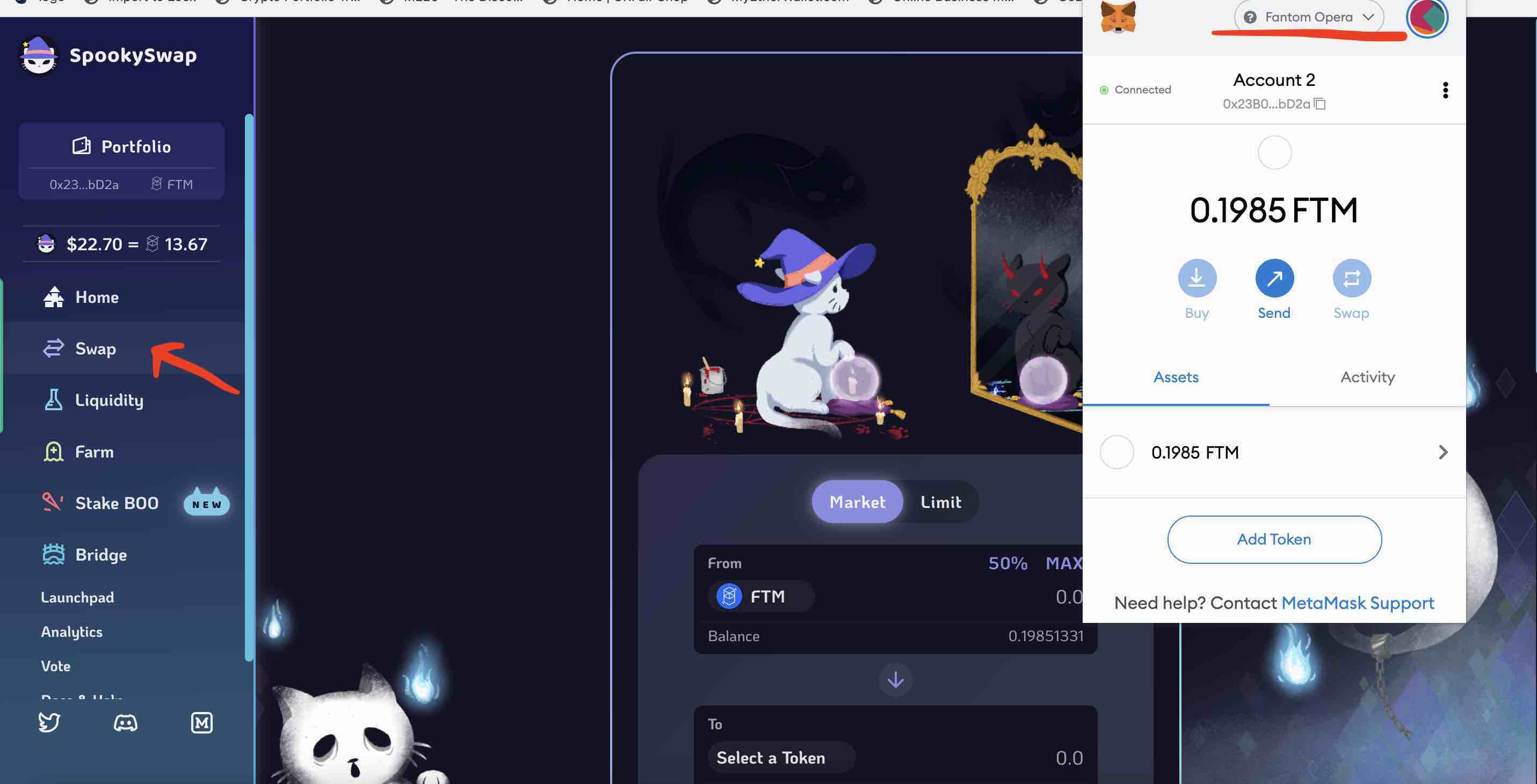
Just click on Swap, choose the Coin Pair you want to Swap, Click on Transfer and Confirm the Transaction.Welcome to the Fantom Ecosystem. Enjoy your ride.
Disclaimer
This website includes information about cryptocurrencies and other financial instruments. All these areas are complex instruments and come with a high risk of losing money. We are NOT giving financial or investment advice; this page is for educational and informational purposes only. Please be careful and make sure that you understand how these instruments work. Also, think about whether you can afford to take the risk of losing your money.
Weirdo.Rocks encourage you to do your own research before you make any investment decision.
New to Fantom? Read our research on what Fantom (FTM) is before you bridge funds across.
Related Course
Cryptocurrency for Beginners
Go from zero to crypto-confident in one weekend
Take the course →More Web3 & Crypto
Best Crypto Airdrops 2023
This article is about rumors and speculations about some of the most profitable Crypto Airdrops 2022. Airdrops are a great way to get started to build an initial capital in Cryptos or also to get some free money.
Cold Staking - How to stake with Ledger Hardware Wallet
Step-by-step guide to staking crypto in Ledger Live. Earn passive rewards on proof-of-stake coins while keeping your assets in cold storage.
Cold Staking - How to stake your crypto coins with BitBox02 Hardware Wallet
Learn how to stake your crypto coins with the BitBox02 Hardware Wallet. Staking is a process which rewards holders of Proof-of-Stake (PoS) coins for keeping their wallets open and connected to the network. Find out more in this article.