How to stake Cryptocurrency Assets with your Trezor Hardware Wallet
Can you stake with Trezor? Learn how to stake PoS coins like Cardano and Tezos, which assets are supported, and how to earn rewards safely.
Enjoying this article?
Get more like it every week — methods, tools, and lessons from building in Cambodia.
No spam. Unsubscribe anytime.
For staking your Cryptocurrency Coin or staking it with Trezor, you are rewarded with a staking reward. This is a way to let your holding work, and besides the (hopefully) advance in your investment prices, you also earn an interest rate for locking up your investment.
In Proof of Stake (PoS) protocols — like Cardano, Avalanche, Solana, Mina and many others — staking helps validate transactions on the blockchain. Older currencies like Bitcoin use Proof-of-Work (PoW) instead, and Ethereum completed its switch from PoW to PoS in September 2022 (the Merge), so ETH is now a stakeable asset too.
There are different ways to stake your Tokens. One can do it on crypto exchanges or staking platforms like Binance, Kraken, Coinbase. This way is the easiest, but maybe not the most secure way.
You can dive deeper about the best hardware wallets in the market and keep your digital assets safe.
Is staking risk-free?
As already mentioned in my article 7 ways how to make money with Cryptocurrencies, the risks are low, but staking is not risk-free.
There are different kinds of risks; one is that you usually have a lockup period if you stake your coin, which means if the markets are crashing, you may not be able to sell your investment on time. If you believe in your projects and hold for the long term, that should not be a big problem. Those lockup periods can go from a couple of days to a year.
If you are holding your coin on an exchange and stake it there, the exchange can get hacked, or there is a security breach, and you lose your coins. Remember, not your key, not your coin.
It also can happen that the staking wallet gets hacked or your validator is not paying you for some reason.
One way to lower your risk to a minimum is using your private hardware wallet or software wallet as a staking wallet for your digital currency. You can use your Ledger or Exodus and, with some tricks, also your Trezor cold wallet to stake some coins.
Staking on Trezor wallet
Update: Trezor Suite now supports native staking. When this guide was first written you had to route everything through third-party apps. Today you can stake directly inside the official Trezor Suite app for:
- Ethereum (ETH) — via a built-in integration with Everstake, with a minimum of around 0.1 ETH and an APY that has recently been up to ~4%.
- Cardano (ADA) — delegate to a staking pool straight from the Staking tab in your Cardano account.
So for ETH and ADA, the easiest and safest path is now Trezor Suite itself — your keys never leave the device. For other proof-of-stake coins, Trezor doesn't stake them natively, but you can still connect your Trezor to a reputable third-party wallet or validator (examples below) and keep custody of your keys.
You can also connect your Exodus wallet Application and use it as a staking interface. You can generate staking rewards through the Exodus rewards app.
At the moment you can stake:
- Algorand (4,69 % APY)
- Solana (6,55 % APY)
- Cosmos (9,67 % APY)
- Cardano (4,91 % APY)
- Ontology (21,43 % APY)
- Tezos (5,66 % APY)
- Vechain (1,45 % APY)
with the Exodus Wallet, and with Exodus Earn you can calculate your possible return. Note: the APY figures above are indicative and change constantly — always check the current rate in the app before staking.
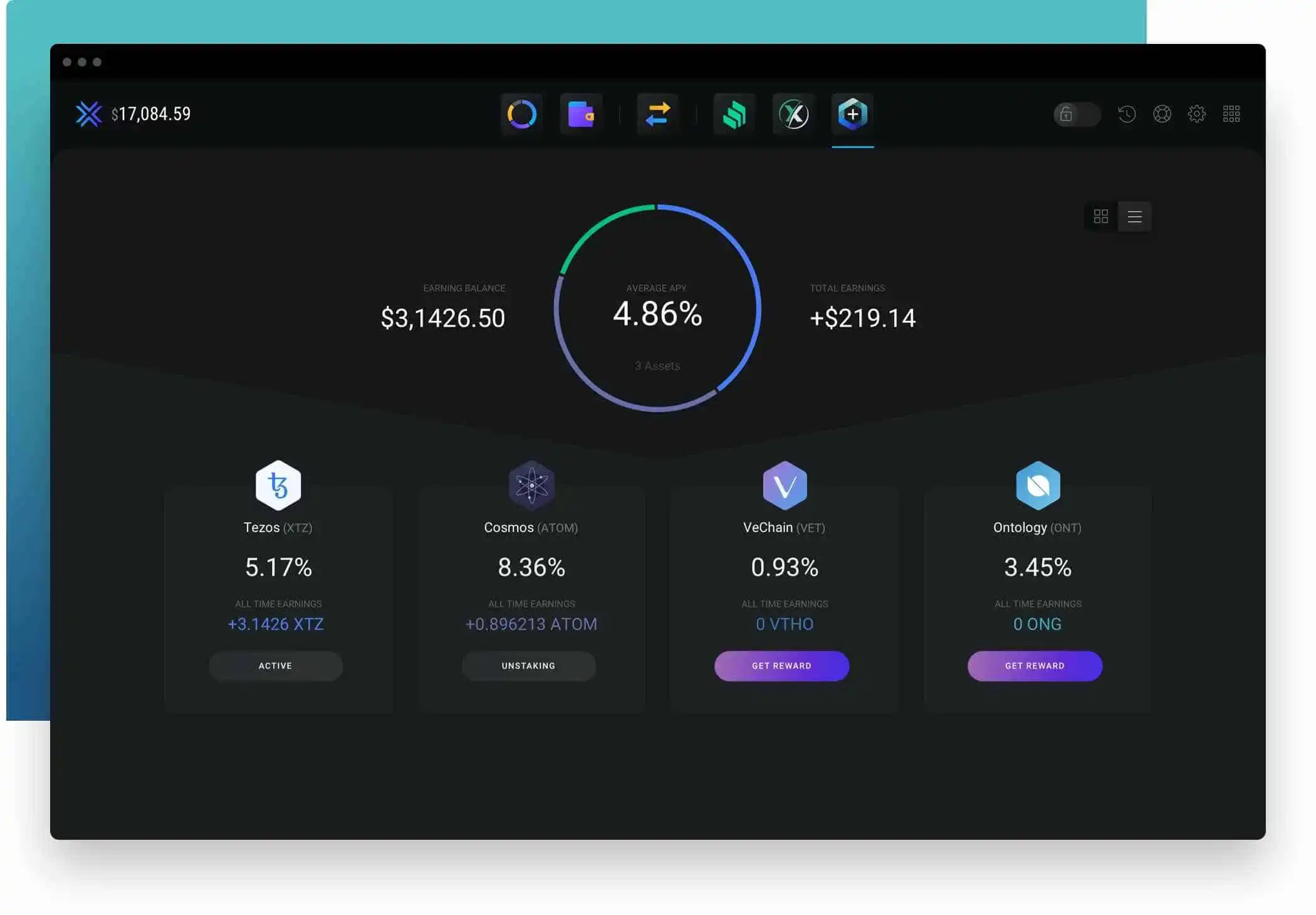
💡 The annual percentage yield (APY) is the real rate of return earned on an investment, taking into account the effect of compounding interest.
If you want to stake Cardano (ADA) with your hardware wallet, you can connect it with the AdaLite Wallet and stake your digital assets there. The good thing here is that it is also very safe since neither the stake pool provider nor AdaLite has access to your funds. You need to keep your private keys in a secure offline place.
If you want to stake Tezos with your Trezor Model T or Trezor Model One, you can connect your Trezor with the Simple Staking wallet and stake from there.
Here at Stakingrewards you see an overview of the most profitable coins to stake. The reward is always also on the lockup period you choose.
The Stakingrewards can vary a lot and are also changing over time.
Summary
If you do not trade and hold your favorite digital currency for longer and are not staking, you are just leaving free money on the table.
The options for a user of Trezor hardware device who wants to stake their assets are a bit limited. There are a couple of workarounds on how to stake your crypto assets and still have a significant amount of security in place.
For the ultimate protection and control over your staked assets, I highly recommend investing in a trusted hardware wallet like Trezor or Ledger. Don't wait - secure your investments now by purchasing a Trezor wallet from our recommended list of hardware wallets.
Top Pick — Trezor Model T — Get it on Trezor.io
- Color touchscreen available
- Open-source firmware
- Store cryptocurrency, passwords and other keys
- Super secure and easy to use, also of EAL5+ certificate
Frequently Asked Questions
Can you stake directly on a Trezor?
Yes — Trezor Suite now has native staking for Ethereum (via Everstake) and Cardano (ADA) built right into the app, which wasn't the case a couple of years ago. For other proof-of-stake coins you connect your Trezor to a third-party wallet or validator while keeping custody of your keys.
What coins can you stake with Trezor?
Natively in Trezor Suite: ETH and ADA. Through connected third-party wallets (like Exodus or AdaLite): many more, including Solana, Cosmos, Tezos, Algorand and others. Support changes over time, so check Trezor's site for the current native list.
Is staking with a Trezor safe?
Staking from a hardware wallet keeps your private keys offline on the device, which is much safer than leaving coins on an exchange to stake. The remaining risks are market volatility and lock-up/unbonding periods — not custody. Only stake what you're comfortable locking up.
References
https://www.allnodes.com/
https://www.exodus.com/
https://www.exodus.com/earn-crypto/
https://adalite.io/
https://simplestaking.com/
https://www.stakingrewards.com/
Disclaimer
The article contains affiliate links. If you are using them, you and I will get a Bonus.
This website includes information about cryptocurrencies and other financial instruments. All these areas are complex instruments and come with a high risk of losing money. We are NOT giving financial or investment advice; this page is for educational and informational purposes only. Please be careful and make sure that you understand how these instruments work. Also, think about whether you can afford to take the risk of losing your money.
Weirdo.Rocks encourage you to do your own research before you make any investment decision.
Related Course
Cryptocurrency for Beginners
Go from zero to crypto-confident in one weekend
Take the course →More Web3 & Crypto
Best Crypto Airdrops 2023
This article is about rumors and speculations about some of the most profitable Crypto Airdrops 2022. Airdrops are a great way to get started to build an initial capital in Cryptos or also to get some free money.
Cold Staking - How to stake with Ledger Hardware Wallet
Step-by-step guide to staking crypto in Ledger Live. Earn passive rewards on proof-of-stake coins while keeping your assets in cold storage.
Cold Staking - How to stake your crypto coins with BitBox02 Hardware Wallet
Learn how to stake your crypto coins with the BitBox02 Hardware Wallet. Staking is a process which rewards holders of Proof-of-Stake (PoS) coins for keeping their wallets open and connected to the network. Find out more in this article.